Smart Scripts
Smart Scripts let PicHound automatically recognize and group images by purpose on any product page, eliminating manual sorting. With 50+ built-in e-commerce scripts covering Taobao, Tmall, JD, Amazon, Shopee, and more, it splits main images, SKU images, detail images, and videos into separate groups. It supports JPEG, PNG, GIF, WEBP, BMP, SVG, AVIF, and offers a 30+ language UI with a Lifetime Pro license at $13.99 for 3 device activations (unlimited when signed in with a Google account). All rules run 100% locally in your browser: the first AI model download is about 100MB, after which everything is processed offline using RMBG-1.4 / MODNet. Jobs of 10 or fewer stay free; larger batches are 12 per day on Free. Upgrade to Lifetime Pro to remove that cap.
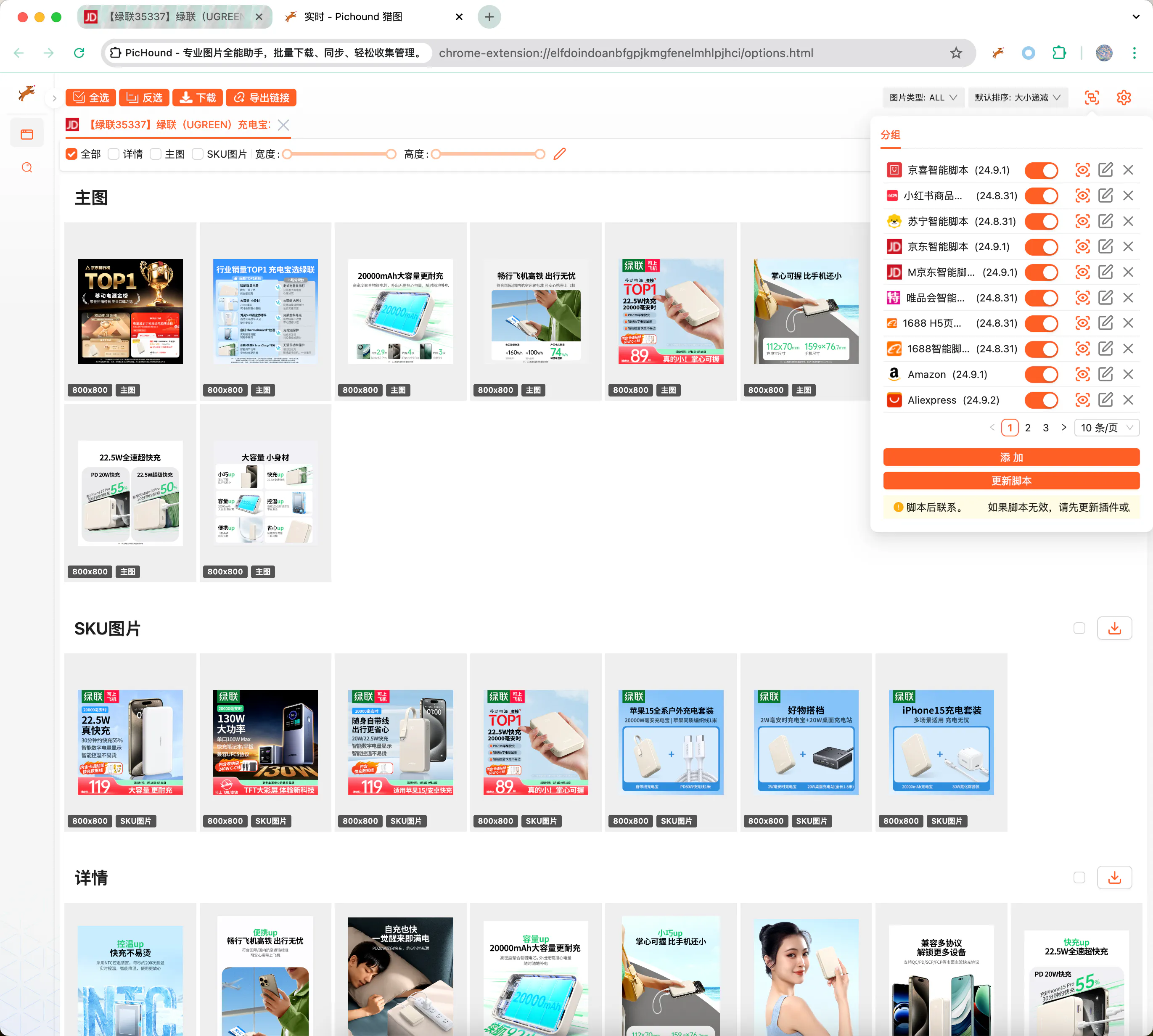
Custom Scripts Extend Any Site
When a target site is not covered by built-in scripts, extend PicHound with a custom JSON template. The template matches page URLs with regular expressions and extracts image/video nodes via DOM selectors or JavaScript expressions, delivering the same grouped download experience as official scripts.
Prerequisites
Writing custom scripts requires the following skills:
- Familiarity with HTML, JavaScript, CSS, and AJAX to understand page structure and data interfaces.
- Proficiency with Chrome DevTools to inspect DOM nodes, review network requests, and debug scripts.
- Solid regex knowledge to accurately extract URLs, attribute paths, and image addresses.
- The ability to troubleshoot independently and iterate rules when pages change.
📃Script Example
The JSON below uses a 1688 product detail page to show how main images, SKU images, detail images, and videos are assigned to separate groups:
{
  "id": 10009,
  "name": "1688",
  "ico": "https://assets.pichound.app/1688.ico",
  "version": "25.1.1",
  "description": "Intelligently extract high-definition images and videos from 1688 product detail pages",
  "reg": "detail.1688.com/offer",
  "status": "prod",
  "tags": [
    "ec"
  ],
  "examples": [
    "https://detail.1688.com/offer/739240146617.html"
  ],
  "groups": [
    {
      "fn": "updateGroupByIds",
      "props": {
        "groupName": "Main Images",
        "groupIndex": 0,
        "source": "Object.entries(window.__INIT_DATA.data).find(([k,v]) => v.componentType === '@ali/tdmod-pc-od-main-pic')[1]?.data?.offerImgList",
        "ids": [
          {
            "attributes": []
          }
        ]
      }
    },
    {
      "fn": "updateGroupByIds",
      "props": {
        "groupName": "SKU",
        "groupIndex": 1,
        "source": "window.__INIT_DATA.globalData.skuModel.skuProps.reduce((acc, o) => { acc.push(...o.value); return acc }, []);",
        "ids": [
          {
            "attributes": [
              "imageUrl"
            ],
            "imageNameAttributes": [
              "name"
            ],
            "replaceUrlRules": [
              {
                "pattern": "!q.*$",
                "replaceValue": "?sku"
              }
            ]
          }
        ]
      }
    },
    {
      "fn": "updateGroupByIds",
      "props": {
        "groupName": "Details",
        "groupIndex": 2,
        "ids": [
          {
            "id": ".content-detail img",
            "attributes": [
              "dataset.lazyloadSrc",
              "src"
            ]
          }
        ]
      }
    },
    {
      "fn": "updateGroupByIds",
      "props": {
        "groupName": "Video",
        "groupIndex": 3,
        "source": "[Object.entries(window.__INIT_DATA.data).find(([k,v]) => v.componentType === '@ali/tdmod-pc-od-main-pic')[1]?.data?.video]",
        "ids": [
          {
            "attributes": [
              "videoUrl"
            ],
            "type": "VIDEO"
          }
        ]
      }
    }
  ]
}
🔑API Documentation
Below are the TypeScript interfaces used to define grouping rules, field mappings, and URL replacement logic in custom scripts:
export interface IGroup {
  _id?: string;
  // Unique ID
  id: string;
  // Configuration: enabled or not
  enable: boolean;
  // Type
  type: 'custom' | 'official';
  // Other configurations
  config?: IGroupConfig;
  // Form
  rawConfig?: string;
  // Update time
  updateAt?: number;
}

export interface IGroupConfig {
  // Unique ID
  id: number;
  // Extension name
  name: string;
  // Extension icon
  ico?: string;
  // Extension version
  version?: string;
  // Extension description
  description?: string;
  // Default matching path
  reg: string;
  // Pre-script
  prevJS: string;
  // Extension grouping function
  groups: IRun[];
  // Release status
  status?: string;
  // Examples
  examples?: string[];
}

export interface IRun {
  // Function capability
  fn: string;
  // Additional parameters
  props: IRunProps;
}

export interface IIds {
  // Parameter Ids
  id: string;
  // Parameter path
  attributes?: string[];
  // Type, possibly video type
  type?: string;
  // Image description information
  alt?: string;
  // Image URL replacement rules
  replaceUrlRules?: IReplaceUrlRule[];
  // Image URL filter rules
  filterUrlRules?: IReplaceUrlRule[];
  // Parameters for getting image names
  imageNameAttributes?: string[];
}

export interface IReplaceUrlRule {
  // Replacement regex
  pattern: string
  // Regex local/full match
  flags?: string
  // Replacement value
  replaceValue?: string
}

export interface IRunProps {
  // Source object, default is document.querySelectorAll, returns iterable array
  source?: string;
  // Parameter Ids
  ids: IIds[];
  // Group name
  groupName: string;
  // Group index
  groupIndex: number;
}