Smart Scripts
Smart scripts help organize visible images on web pages by auto-grouping. They only work with images already loaded on the page. You can create custom scripts for your workflow.
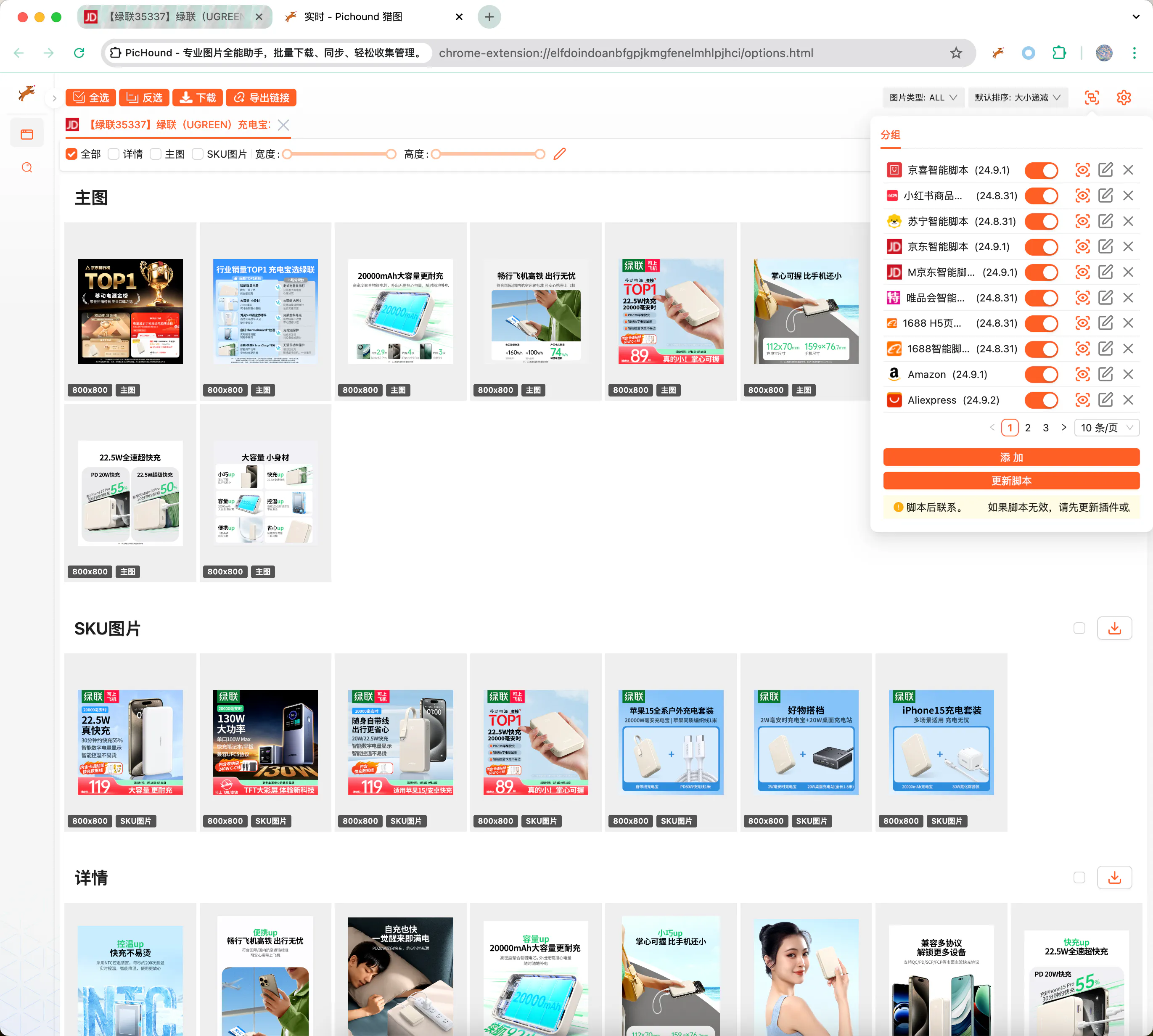
The custom JSON template configuration feature can configure regular expressions for a website’s web code, allowing the extension to dynamically expand supported websites.
Readers and users of this article need to have the following capabilities:
- Understand basic web front-end technologies such as HTML, JavaScript, CSS, AJAX, etc., to better understand web page structure and code logic, providing a foundation for regular expression configuration.
- Proficient in using Chrome browser developer tools, able to use this tool for web page analysis, debugging, and viewing code structure, providing strong support for the configuration process.
- Proficient in using regular expressions and tools, mastering the syntax and rules of regular expressions, able to accurately extract the required web page content.
- Have the ability to self-learn and solve problems, able to actively learn and explore solutions when encountering problems during use, to ensure successful completion of configuration work.
📃Script Example
Visit a store on “JD.com” and group related images by configuring scripts
{
  "id": 10009,
  "name": "1688",
  "ico": "https://assets.pichound.app/1688.ico",
  "version": "25.1.1",
  "description": "Intelligently extract high-definition images and videos from 1688 product detail pages",
  "reg": "detail.1688.com/offer",
  "status": "prod",
  "tags": [
    "ec"
  ],
  "examples": [
    "https://detail.1688.com/offer/739240146617.html"
  ],
  "groups": [
    {
      "fn": "updateGroupByIds",
      "props": {
        "groupName": "Main Images",
        "groupIndex": 0,
        "source": "Object.entries(window.__INIT_DATA.data).find(([k,v]) => v.componentType === '@ali/tdmod-pc-od-main-pic')[1]?.data?.offerImgList",
        "ids": [
          {
            "attributes": []
          }
        ]
      }
    },
    {
      "fn": "updateGroupByIds",
      "props": {
        "groupName": "SKU",
        "groupIndex": 1,
        "source": "window.__INIT_DATA.globalData.skuModel.skuProps.reduce((acc, o) => { acc.push(...o.value); return acc }, []);",
        "ids": [
          {
            "attributes": [
              "imageUrl"
            ],
            "imageNameAttributes": [
              "name"
            ],
            "replaceUrlRules": [
              {
                "pattern": "!q.*$",
                "replaceValue": "?sku"
              }
            ]
          }
        ]
      }
    },
    {
      "fn": "updateGroupByIds",
      "props": {
        "groupName": "Details",
        "groupIndex": 2,
        "ids": [
          {
            "id": ".content-detail img",
            "attributes": [
              "dataset.lazyloadSrc",
              "src"
            ]
          }
        ]
      }
    },
    {
      "fn": "updateGroupByIds",
      "props": {
        "groupName": "Video",
        "groupIndex": 3,
        "source": "[Object.entries(window.__INIT_DATA.data).find(([k,v]) => v.componentType === '@ali/tdmod-pc-od-main-pic')[1]?.data?.video]",
        "ids": [
          {
            "attributes": [
              "videoUrl"
            ],
            "type": "VIDEO"
          }
        ]
      }
    }
  ]
}
🔑API Documentation
export interface IGroup {
  _id?: string;
  // Unique ID
  id: string;
  // Configuration: enabled or not
  enable: boolean;
  // Type
  type: 'custom' | 'official';
  // Other configurations
  config?: IGroupConfig;
  // Form
  rawConfig?: string;
  // Update time
  updateAt?: number;
}

export interface IGroupConfig {
  // Unique ID
  id: number;
  // Extension name
  name: string;
  // Extension icon
  ico?: string;
  // Extension version
  version?: string;
  // Extension description
  description?: string;
  // Default matching path
  reg: string;
  // Pre-script
  prevJS: string;
  // Extension grouping function
  groups: IRun[];
  // Release status
  status?: string;
  // Examples
  examples?: string[];
}

export interface IRun {
  // Function capability
  fn: string;
  // Additional parameters
  props: IRunProps;
}

export interface IIds {
  // Parameter Ids
  id: string;
  // Parameter path
  attributes?: string[];
  // Type, possibly video type
  type?: string;
  // Image description information
  alt?: string;
  // Image URL replacement rules
  replaceUrlRules?: IReplaceUrlRule[];
  // Image URL filter rules
  filterUrlRules?: IReplaceUrlRule[];
  // Parameters for getting image names
  imageNameAttributes?: string[];
}

export interface IReplaceUrlRule {
  // Replacement regex
  pattern: string
  // Regex local/full match
  flags?: string
  // Replacement value
  replaceValue?: string
}

export interface IRunProps {
  // Source object, default is document.querySelectorAll, returns iterable array
  source?: string;
  // Parameter Ids
  ids: IIds[];
  // Group name
  groupName: string;
  // Group index
  groupIndex: number;
}