スマートスクリプト
スマートスクリプトは、商品ページ上の画像を用途ごとに自動認識・グループ化し、手作業の仕分けをなくします。Taobao、Tmall、JD、Amazon、Shopee などをカバーする EC スクリプト 50+ を内蔵し、メイン画像、SKU 画像、詳細画像、動画を別グループに分けます。JPEG、PNG、GIF、WEBP、BMP、SVG、AVIF に対応し、UI は 30 以上の言語。Lifetime Pro は $13.99 で 3 台までアクティベーション(Google アカウントなら無制限)。ルールはすべてブラウザ内で 100% ローカル実行。AI モデルの初回ダウンロードは約 100MB、以降は RMBG-1.4 / MODNet でオフライン処理。無料ユーザーは10枚以下は無料、大批次は1日12回。無制限にするなら Lifetime Pro へ。
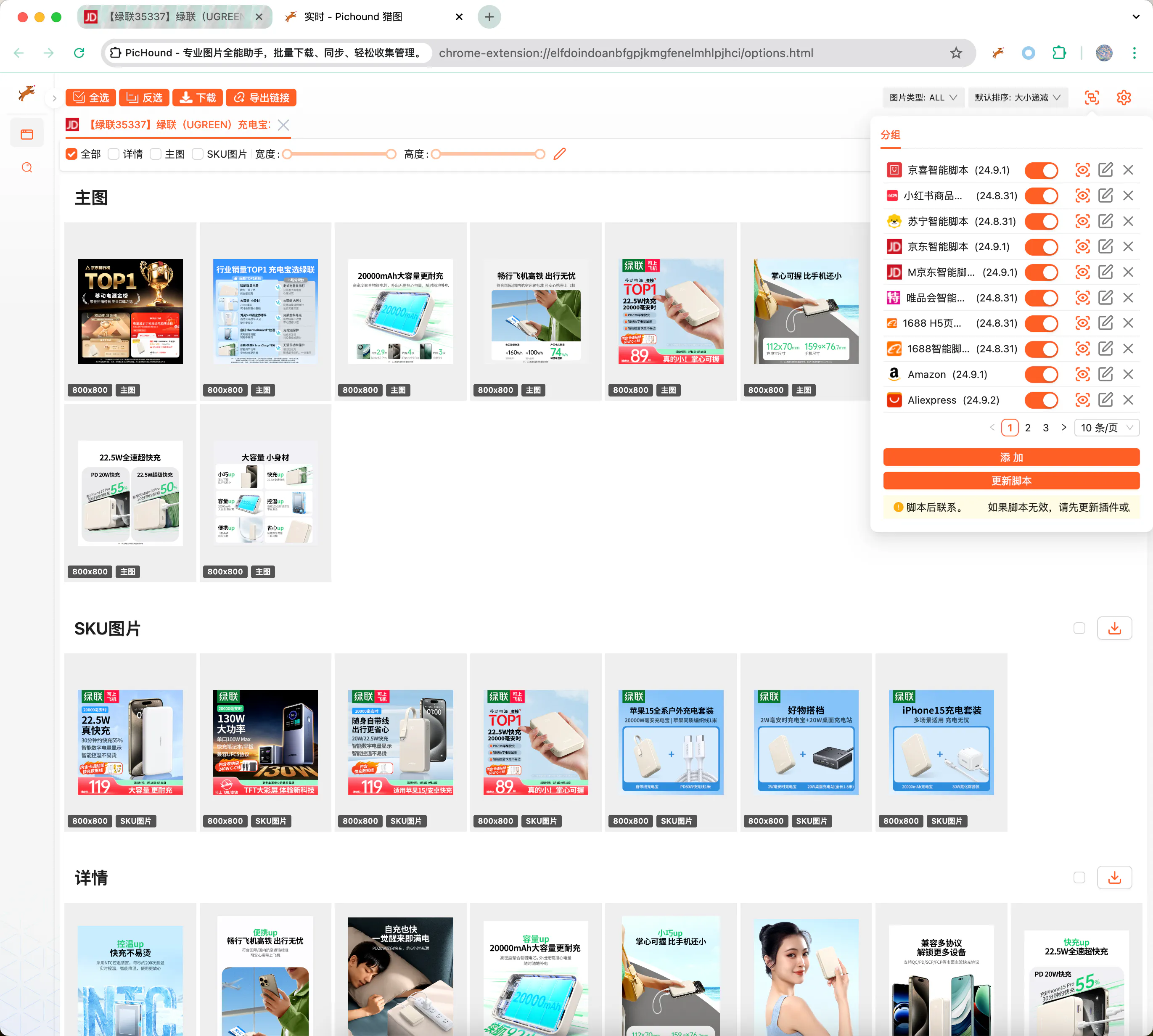
カスタムスクリプトで任意サイトに拡張
内蔵スクリプトが対象サイトをカバーしていない場合は、カスタム JSON テンプレートで PicHound を拡張します。テンプレートは正規表現でページ URL をマッチし、DOM セレクタまたは JavaScript 式で画像/動画ノードを抽出し、公式スクリプトと同じグループ化ダウンロード体験を提供します。
前提スキル
カスタムスクリプトを書くには次が必要です。
- HTML、JavaScript、CSS、AJAX に慣れ、ページ構造とデータインターフェースを理解できること。
- Chrome DevTools で DOM ノードの検査、ネットワークリクエストの確認、スクリプトのデバッグができること。
- 正規表現で URL、属性パス、画像アドレスを正確に抽出できること。
- ページが変わったときに自分で切り分け、ルールを反復できること。
📃スクリプト例
次の JSON は 1688 商品詳細ページを例に、メイン画像、SKU 画像、詳細画像、動画を別グループへ割り当てる方法を示します。
{
  "id": 10009,
  "name": "1688",
  "ico": "https://assets.pichound.app/1688.ico",
  "version": "25.1.1",
  "description": "Intelligently extract high-definition images and videos from 1688 product detail pages",
  "reg": "detail.1688.com/offer",
  "status": "prod",
  "tags": [
    "ec"
  ],
  "examples": [
    "https://detail.1688.com/offer/739240146617.html"
  ],
  "groups": [
    {
      "fn": "updateGroupByIds",
      "props": {
        "groupName": "Main Images",
        "groupIndex": 0,
        "source": "Object.entries(window.__INIT_DATA.data).find(([k,v]) => v.componentType === '@ali/tdmod-pc-od-main-pic')[1]?.data?.offerImgList",
        "ids": [
          {
            "attributes": []
          }
        ]
      }
    },
    {
      "fn": "updateGroupByIds",
      "props": {
        "groupName": "SKU",
        "groupIndex": 1,
        "source": "window.__INIT_DATA.globalData.skuModel.skuProps.reduce((acc, o) => { acc.push(...o.value); return acc }, []);",
        "ids": [
          {
            "attributes": [
              "imageUrl"
            ],
            "imageNameAttributes": [
              "name"
            ],
            "replaceUrlRules": [
              {
                "pattern": "!q.*$",
                "replaceValue": "?sku"
              }
            ]
          }
        ]
      }
    },
    {
      "fn": "updateGroupByIds",
      "props": {
        "groupName": "Details",
        "groupIndex": 2,
        "ids": [
          {
            "id": ".content-detail img",
            "attributes": [
              "dataset.lazyloadSrc",
              "src"
            ]
          }
        ]
      }
    },
    {
      "fn": "updateGroupByIds",
      "props": {
        "groupName": "Video",
        "groupIndex": 3,
        "source": "[Object.entries(window.__INIT_DATA.data).find(([k,v]) => v.componentType === '@ali/tdmod-pc-od-main-pic')[1]?.data?.video]",
        "ids": [
          {
            "attributes": [
              "videoUrl"
            ],
            "type": "VIDEO"
          }
        ]
      }
    }
  ]
}
🔑API ドキュメント
カスタムスクリプトでグループ化ルール、フィールドマッピング、URL 置換ロジックを定義する TypeScript インターフェースです。
export interface IGroup {
  _id?: string;
  // Unique ID
  id: string;
  // Configuration: enabled or not
  enable: boolean;
  // Type
  type: 'custom' | 'official';
  // Other configurations
  config?: IGroupConfig;
  // Form
  rawConfig?: string;
  // Update time
  updateAt?: number;
}

export interface IGroupConfig {
  // Unique ID
  id: number;
  // Extension name
  name: string;
  // Extension icon
  ico?: string;
  // Extension version
  version?: string;
  // Extension description
  description?: string;
  // Default matching path
  reg: string;
  // Pre-script
  prevJS: string;
  // Extension grouping function
  groups: IRun[];
  // Release status
  status?: string;
  // Examples
  examples?: string[];
}

export interface IRun {
  // Function capability
  fn: string;
  // Additional parameters
  props: IRunProps;
}

export interface IIds {
  // Parameter Ids
  id: string;
  // Parameter path
  attributes?: string[];
  // Type, possibly video type
  type?: string;
  // Image description information
  alt?: string;
  // Image URL replacement rules
  replaceUrlRules?: IReplaceUrlRule[];
  // Image URL filter rules
  filterUrlRules?: IReplaceUrlRule[];
  // Parameters for getting image names
  imageNameAttributes?: string[];
}

export interface IReplaceUrlRule {
  // Replacement regex
  pattern: string
  // Regex local/full match
  flags?: string
  // Replacement value
  replaceValue?: string
}

export interface IRunProps {
  // Source object, default is document.querySelectorAll, returns iterable array
  source?: string;
  // Parameter Ids
  ids: IIds[];
  // Group name
  groupName: string;
  // Group index
  groupIndex: number;
}
次のステップ
最終更新日