스마트 스크립트
스마트 스크립트는 상품 페이지에서 용도별로 이미지를 자동 인식·그룹화해 수동 분류를 없앱니다. Taobao, Tmall, JD, Amazon, Shopee 등을 커버하는 이커머스 스크립트 50+가 메인, SKU, 상세, 동영상을 별도 그룹으로 나눕니다. JPEG, PNG, GIF, WEBP, BMP, SVG, AVIF를 지원하고 UI는 언어 30+. Lifetime Pro는 $13.99로 3대 활성화(Google 계정 시 무제한). 모든 규칙은 브라우저에서 100% 로컬 실행. AI 모델 첫 다운로드 약 100MB, 이후 RMBG-1.4 / MODNet으로 오프라인 처리. 무료 사용자는 10장 이하 무료, 대량 배치는 하루 12회. 무제한은 Lifetime Pro로.
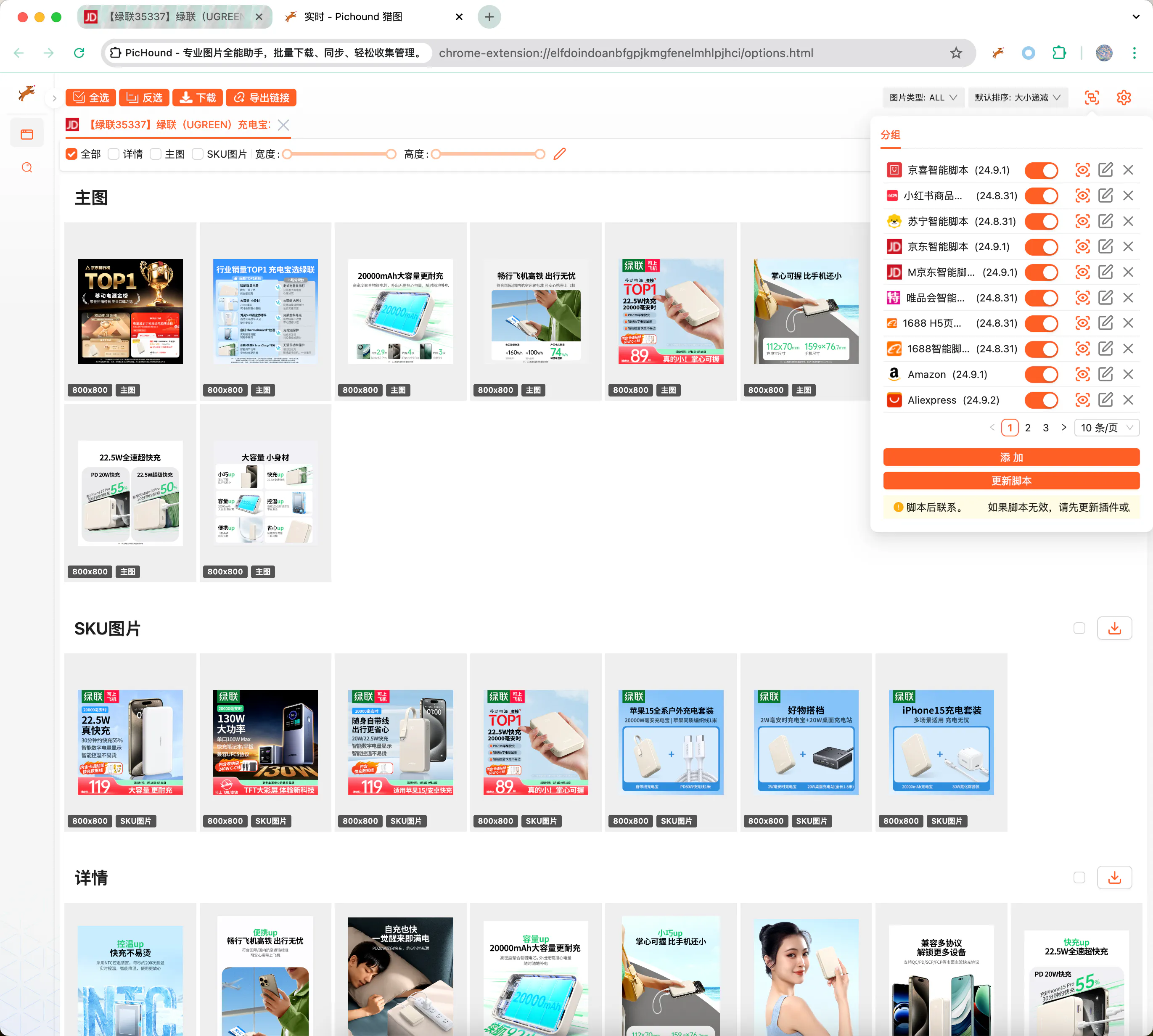
사용자 지정 스크립트로 어떤 사이트든 확장
내장 스크립트가 대상 사이트를 커버하지 않으면 사용자 지정 JSON 템플릿으로 PicHound를 확장합니다. 템플릿은 정규식으로 페이지 URL을 매칭하고 DOM 선택자 또는 JavaScript 표현식으로 이미지/동영상 노드를 추출해, 공식 스크립트와 같은 그룹화 다운로드 경험을 제공합니다.
사전 요건
사용자 지정 스크립트를 작성하려면 다음이 필요합니다.
- HTML, JavaScript, CSS, AJAX에 익숙해 페이지 구조와 데이터 인터페이스를 이해할 것.
- Chrome DevTools로 DOM 노드 검사, 네트워크 요청 확인, 스크립트 디버깅이 가능할 것.
- 정규식으로 URL, 속성 경로, 이미지 주소를 정확히 추출할 것.
- 페이지가 바뀌면 스스로 원인을 찾고 규칙을 반복 개선할 것.
📃스크립트 예제
아래 JSON은 1688 상품 상세 페이지에서 메인, SKU, 상세, 동영상을 별도 그룹에 넣는 방법입니다.
{
  "id": 10009,
  "name": "1688",
  "ico": "https://assets.pichound.app/1688.ico",
  "version": "25.1.1",
  "description": "Intelligently extract high-definition images and videos from 1688 product detail pages",
  "reg": "detail.1688.com/offer",
  "status": "prod",
  "tags": [
    "ec"
  ],
  "examples": [
    "https://detail.1688.com/offer/739240146617.html"
  ],
  "groups": [
    {
      "fn": "updateGroupByIds",
      "props": {
        "groupName": "Main Images",
        "groupIndex": 0,
        "source": "Object.entries(window.__INIT_DATA.data).find(([k,v]) => v.componentType === '@ali/tdmod-pc-od-main-pic')[1]?.data?.offerImgList",
        "ids": [
          {
            "attributes": []
          }
        ]
      }
    },
    {
      "fn": "updateGroupByIds",
      "props": {
        "groupName": "SKU",
        "groupIndex": 1,
        "source": "window.__INIT_DATA.globalData.skuModel.skuProps.reduce((acc, o) => { acc.push(...o.value); return acc }, []);",
        "ids": [
          {
            "attributes": [
              "imageUrl"
            ],
            "imageNameAttributes": [
              "name"
            ],
            "replaceUrlRules": [
              {
                "pattern": "!q.*$",
                "replaceValue": "?sku"
              }
            ]
          }
        ]
      }
    },
    {
      "fn": "updateGroupByIds",
      "props": {
        "groupName": "Details",
        "groupIndex": 2,
        "ids": [
          {
            "id": ".content-detail img",
            "attributes": [
              "dataset.lazyloadSrc",
              "src"
            ]
          }
        ]
      }
    },
    {
      "fn": "updateGroupByIds",
      "props": {
        "groupName": "Video",
        "groupIndex": 3,
        "source": "[Object.entries(window.__INIT_DATA.data).find(([k,v]) => v.componentType === '@ali/tdmod-pc-od-main-pic')[1]?.data?.video]",
        "ids": [
          {
            "attributes": [
              "videoUrl"
            ],
            "type": "VIDEO"
          }
        ]
      }
    }
  ]
}
🔑API 문서
사용자 지정 스크립트에서 그룹화 규칙, 필드 매핑, URL 치환 로직을 정의하는 TypeScript 인터페이스입니다.
export interface IGroup {
  _id?: string;
  // Unique ID
  id: string;
  // Configuration: enabled or not
  enable: boolean;
  // Type
  type: 'custom' | 'official';
  // Other configurations
  config?: IGroupConfig;
  // Form
  rawConfig?: string;
  // Update time
  updateAt?: number;
}

export interface IGroupConfig {
  // Unique ID
  id: number;
  // Extension name
  name: string;
  // Extension icon
  ico?: string;
  // Extension version
  version?: string;
  // Extension description
  description?: string;
  // Default matching path
  reg: string;
  // Pre-script
  prevJS: string;
  // Extension grouping function
  groups: IRun[];
  // Release status
  status?: string;
  // Examples
  examples?: string[];
}

export interface IRun {
  // Function capability
  fn: string;
  // Additional parameters
  props: IRunProps;
}

export interface IIds {
  // Parameter Ids
  id: string;
  // Parameter path
  attributes?: string[];
  // Type, possibly video type
  type?: string;
  // Image description information
  alt?: string;
  // Image URL replacement rules
  replaceUrlRules?: IReplaceUrlRule[];
  // Image URL filter rules
  filterUrlRules?: IReplaceUrlRule[];
  // Parameters for getting image names
  imageNameAttributes?: string[];
}

export interface IReplaceUrlRule {
  // Replacement regex
  pattern: string
  // Regex local/full match
  flags?: string
  // Replacement value
  replaceValue?: string
}

export interface IRunProps {
  // Source object, default is document.querySelectorAll, returns iterable array
  source?: string;
  // Parameter Ids
  ids: IIds[];
  // Group name
  groupName: string;
  // Group index
  groupIndex: number;
}
다음 단계
마지막 업데이트