智能脚本
智能脚本让 PicHound 在任意商品页自动识别并按用途分组图片,省去手动筛选时间。内置 50+ 电商平台脚本,覆盖淘宝、天猫、京东、Amazon、Shopee 等,自动拆分主图、SKU 图、详情图与视频;支持 JPEG、PNG、GIF、WEBP、BMP、SVG、AVIF 等常见格式,配合 30+ 语言界面与终身版 ¥71.99 / $13.99 固定授权,可在 3 台设备激活(Google 账号登录无设备限制)。所有规则 100% 本地运行,首次 AI 模型下载约 100MB,之后完全离线处理,页面数据与图片不会上传服务器。10 张及以下免费;更大的批次每天 12 次。升级终身版可取消大批次日限。
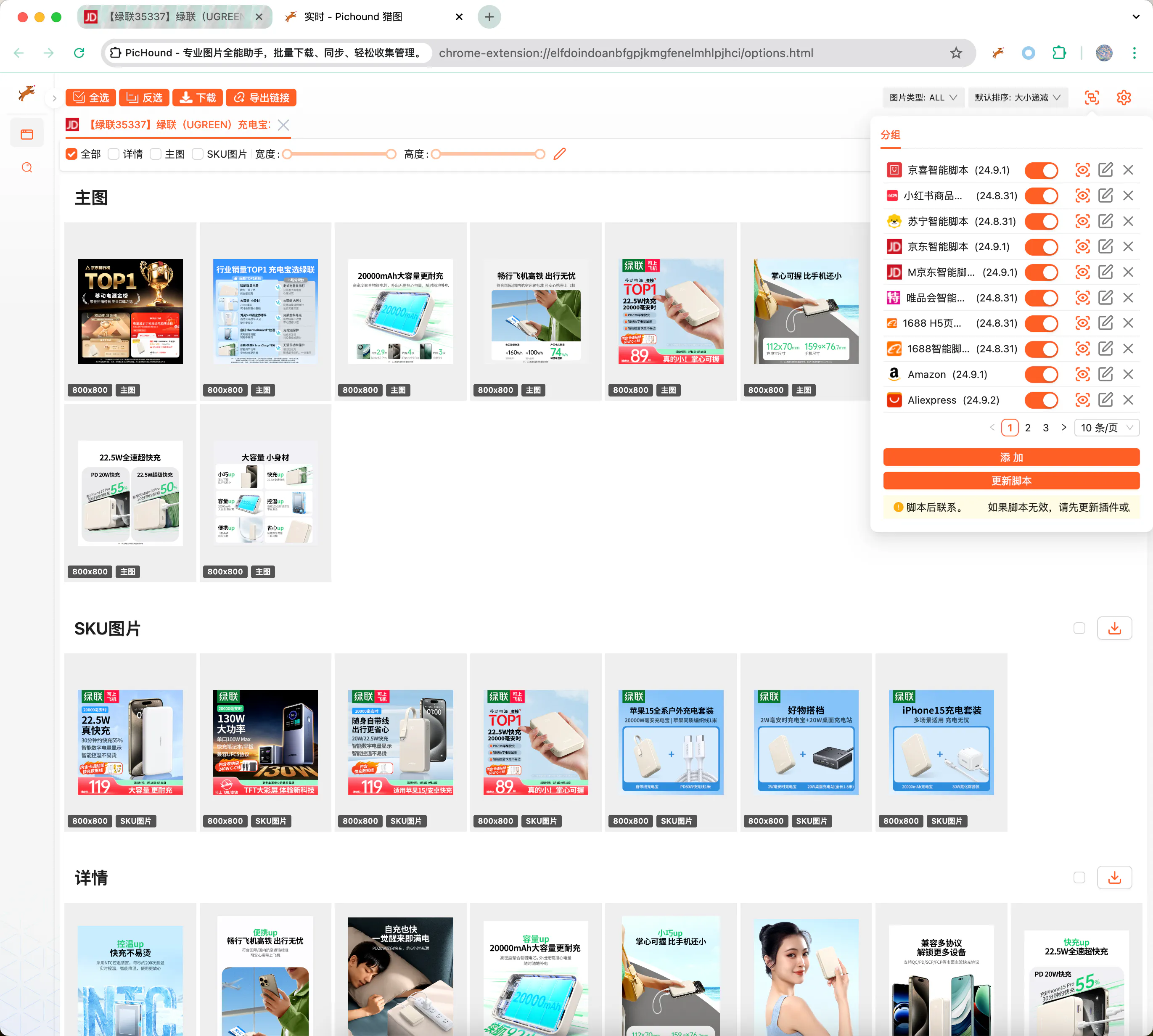
自定义脚本扩展任意站点
当内置脚本未覆盖目标站点时,可通过自定义 JSON 模板快速扩展。模板使用正则表达式匹配页面 URL,并通过 DOM 选择器或 JavaScript 表达式提取所需图片/视频节点,实现与官方脚本一致的分组下载体验。
使用前准备
编写自定义脚本需要以下基础能力:
- 熟悉 HTML、JavaScript、CSS 与 AJAX,能够理解页面结构与数据接口。
- 熟练使用 Chrome 开发者工具,定位 DOM 节点、查看网络请求与调试脚本。
- 掌握正则表达式语法,能准确提取 URL、属性路径与图片地址。
- 具备独立排查与解决问题的能力,遇到异常页面可自行迭代规则。
📃脚本示例
以下 JSON 以 1688 商品详情页为例,展示如何将主图、SKU、详情图和视频分别归入不同分组:
{
  "id": 10009,
  "name": "1688",
  "ico": "https://assets.pichound.app/1688.ico",
  "version": "25.1.1",
  "description": "智能提取1688详情页面商品相关大图及视频",
  "reg": "detail.1688.com/offer",
  "status": "prod",
  "tags": [
    "ec"
  ],
  "examples": [
    "https://detail.1688.com/offer/739240146617.html"
  ],
  "groups": [
    {
      "fn": "updateGroupByIds",
      "props": {
        "groupName": "主图",
        "groupIndex": 0,
        "source": "Object.entries(window.__INIT_DATA.data).find(([k,v]) => v.componentType === '@ali/tdmod-pc-od-main-pic')[1]?.data?.offerImgList",
        "ids": [
          {
            "attributes": []
          }
        ]
      }
    },
    {
      "fn": "updateGroupByIds",
      "props": {
        "groupName": "SKU",
        "groupIndex": 1,
        "source": "window.__INIT_DATA.globalData.skuModel.skuProps.reduce((acc, o) => { acc.push(...o.value); return acc }, []);",
        "ids": [
          {
            "attributes": [
              "imageUrl"
            ],
            "imageNameAttributes": [
              "name"
            ],
            "replaceUrlRules": [
              {
                "pattern": "!q.*$",
                "replaceValue": "?sku"
              }
            ]
          }
        ]
      }
    },
    {
      "fn": "updateGroupByIds",
      "props": {
        "groupName": "详情",
        "groupIndex": 2,
        "ids": [
          {
            "id": ".content-detail img",
            "attributes": [
              "dataset.lazyloadSrc",
              "src"
            ]
          }
        ]
      }
    },
    {
      "fn": "updateGroupByIds",
      "props": {
        "groupName": "视频",
        "groupIndex": 3,
        "source": "[Object.entries(window.__INIT_DATA.data).find(([k,v]) => v.componentType === '@ali/tdmod-pc-od-main-pic')[1]?.data?.video]",
        "ids": [
          {
            "attributes": [
              "videoUrl"
            ],
            "type": "VIDEO"
          }
        ]
      }
    }
  ]
}
🔑API文档
以下是自定义脚本可用的 TypeScript 接口定义,用于描述分组规则、字段映射与替换逻辑:
export interface IGroup {
  _id?: string;
  // 唯一 ID
  id: string;
  // 配置:是否开启
  enable: boolean;
  // 类型
  type: 'custom' | 'official';
  // 其他配置
  config?: IGroupConfig;
  // 表单
  rawConfig?: string;
  // 更新时间
  updateAt?: number;
}

export interface IGroupConfig {
  // 唯一 ID
  id: number;
  // 插件名
  name: string;
  // 插件icon
  ico?: string;
  // 插件版本
  version?: string;
  // 插件描述
  description?: string;
  // 默认匹配路径
  reg: string;
  // 前置脚本
  prevJS: string;
  // 插件分组功能
  groups: IRun[];
  // 发布状态
  status?: string;
  // 例子
  examples?: string[];
}

export interface IRun {
  // 函数能力
  fn: string;
  // 额外传参
  props: IRunProps;
}

export interface IIds {
  // 参数 Ids
  id: string;
  // 参数路径
  attributes?: string[];
  // 类型, 有可能是视频类型
  type?: string;
  // 图片描述信息
  alt?: string;
  // 替换图片规则
  replaceUrlRules?: IReplaceUrlRule[];
  // 过滤图片规则
  filterUrlRules?: IReplaceUrlRule[];
  // 获取图片名称的参数
  imageNameAttributes?: string[];
}

export interface IReplaceUrlRule {
  // 替换正则
  pattern: string
  // 正则局部/全匹配
  flags?: string
  // 替换值
  replaceValue?: string
}

export interface IRunProps {
  // 来源对象 默认是 document.querySelectorAll, 返回可迭代数组
  source?: string;
  // 参数 Ids
  ids: IIds[];
  // 分组名
  groupName: string;
  // 分组索引
  groupIndex: number;
}
下一步
- 🚀 3 分钟快速开始
- 📖 查看插件概览
- 🛒 升级终身版,解锁全部平台脚本
最后更新于